
POSTMAN BEST PRACTICES
API Catalog
Building quality APIs has never been more important. At Postman, we believe being API-first is the key to innovation in the AI era. We built Postman Best Practices to share the foundational ideas Postman is built on and enable you to do your best work.
As organizations grow, their API surface grows faster than their ability to manage it. At Postman, we believe that every engineering team and every AI agent they work with deserves a complete, accurate, and up-to-date view of every API and service running in their organization.
Most API visibility programs fail not because teams lack good intentions, but because they lack a single source of truth. Engineers build on top of undocumented services, shadow endpoints accumulate undetected, and AI coding tools generate incorrect implementations because they have no access to your internal contracts.
This chapter shows you how to establish a catalog that reflects your entire API landscape automatically, enforce governance standards in CI without creating bottlenecks, and create the structured foundation that lets both your developers and your AI agents work with confidence.

Abhinav Asthana
Postman CEO and Co-founder

Ankit Sobti
Postman Field CTO and Co-founder
The API Catalog gives engineering teams a single pane of glass for all their APIs and services at their organization. Through the API Catalog, organizations can observe their entire API landscape irrespective of the infrastructure that these APIs have been deployed to and across all their environments (e.g., dev, test, prod).
The API Catalog incorporates API governance, enabling central teams to enforce rules through API specifications in the dev loop within the Postman app as well as in CI through the Postman CLI. The API Catalog is built to be AI-native: using Postman's Agent Mode, users can explore the catalog to understand their system architecture, assess key metrics, and even investigate when something is broken.
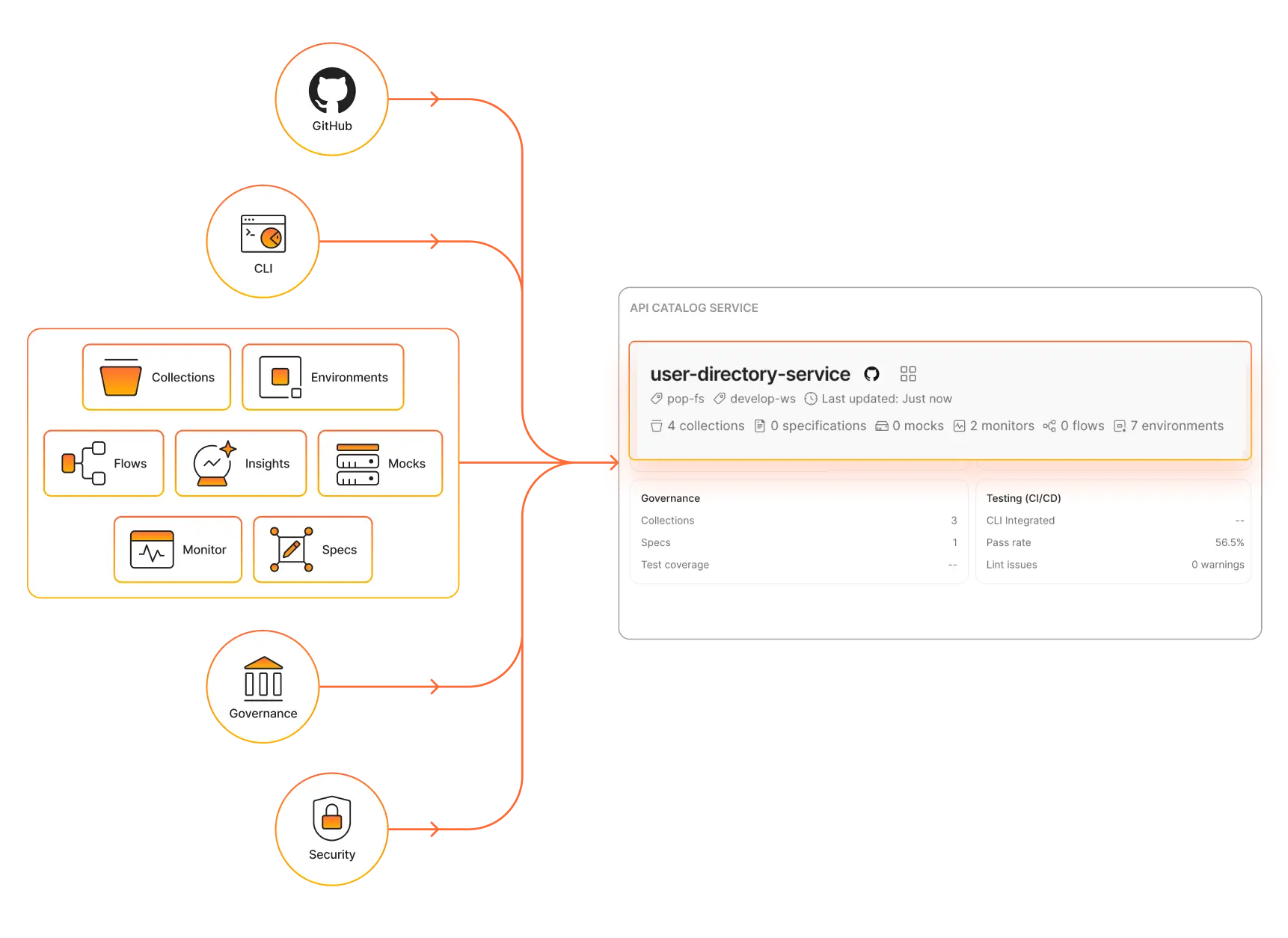
What is in the API Catalog?
The API Catalog lists all git-connected Postman workspaces (Projects) that are present in the Postman instance automatically. There is no specific step needed to add an element to the catalog other than engineering teams connecting a Postman workspace to their source code.
The API Catalog pulls in objects across the entire organization. Users with the right user group permissions can see the entire catalog. This will typically be a Platform Engineering group or Staff/Principal-level engineers within a company. If a user does not have access to the workspace and is not in this group, they will only see the projects that they have access to.
Using the API Catalog
The API Catalog has three core components: Catalog List, Governance groups, and System environments.
1. Catalog List
The Catalog List can be filtered or sorted across multiple dimensions. To maintain an authoritative list of APIs, we recommend choosing a tag to denote the APIs you want to manage. The API Catalog also helps identify API owners using Postman's built-in identity or deriving that relationship through code ownership.
The API Catalog allows specific views to be created for a combination of filters and tags, enabling users to quickly jump to the view that they are interested in. The Catalog List allows multiple dimensions to be viewed together, and users can toggle them on and off.
Tip: Design your tag taxonomy before populating the catalog. Before you begin adding APIs to the catalog, define a consistent set of tags that reflects how your organization thinks about APIs. Consider tagging by domain (e.g., payments, identity), by maturity level (e.g., stable, beta, deprecated), by compliance scope (e.g., pci-compliant, internal-only), or by team ownership. Using a consistent tagging convention from the start makes filtering, governance grouping, and saved catalog views much more useful. It is much harder to establish your tagging taxonomy after the fact.
2. Governance groups
Governance groups allow the creation and enforcement of rules for API specifications like OpenAPI and AsyncAPI. Rules can be applied to these specifications as a group. For example, you might have one set of rules for your public APIs and another set of rules for your internal data APIs.
A developer using Postman for API design can see these rules in the Postman app. The Postman CLI can pull these rules and enforce them in the CI pipeline and can be configured to block releases or just trigger warnings. Governance rules can also be used to score APIs and determine how compliant your APIs are with your overall posture.
Tip: Set up your governance groups before onboarding teams. Governance rules are most effective when defined before developers begin working in the catalog, not after. Establish at least a baseline governance group—covering your organization's core linting rules—before inviting your broader engineering teams. Consider creating separate governance groups for different API audiences: a stricter rule set for public-facing APIs and a more permissive set for internal service-to-service APIs lets you apply the right level of rigor where it matters most without blocking internal development velocity.
3. System environments
A system environment helps represent the idea of your actual infrastructure environment (e.g., production, stage, beta) in which your APIs are deployed. Creating a system environment helps Postman's tooling and analytics systems know how to correctly aggregate the data around your APIs.
A common scenario is running integration tests across multiple APIs in your CI environment. Without a system environment, it is hard to tell where the test was done—some tests could be on a local environment, some could be done in beta, and so on. Using a system environment in your CI config resolves this issue and helps bring these results together so you can see how each API is performing. The same applies to other Postman tools like Monitors and Insights.
Tip: Define system environments before running tests or configuring Monitors. System environments are most valuable when configured before you begin running integration tests or setting up Monitors. Without them, test results, Monitor runs, and Insights data arrive without the environment context needed to aggregate them meaningfully. At a minimum, define environments for production, staging, and development before you operationalize the catalog for your organization. When configuring your CI pipeline, pass the appropriate system environment identifier as part of each Postman CLI command to ensure every run is correctly tagged.
API views
The API Catalog displays a list of all your APIs and services across your organization. When you click on an API in the list, you'll come into the view for that specific API. This view lists all data points that Postman currently has knowledge of across your dev, test, and production environments.
From here, you can jump into a Postman workspace or the source code of the API, investigate key health metrics, and see the dependency graph of the API (generated through Insights). If you have integrated Postman Insights, the API Catalog view will also show shadow endpoints that Postman could not find being managed properly—these endpoints might not be in any Postman Collection or API specification.
Agent Mode in Postman can be used within API views, so users can go from inspection to implementation instantly, provided they have the right access.
Discovering APIs and services
To help you get started quickly, the API Catalog provides the ability to discover services through multiple sources: API Gateways, Cluster Watcher service, Postman Insights, and existing Postman workspaces. Using these flows, teams can discover APIs that are not currently being managed through their Postman instance and bring them into the API Catalog. The onboarding workflow can automatically create a PR and send it to the specific API owner's repository.
1. Integrating the API Catalog with API Gateways
For most organizations, connecting your API Gateways is the fastest path to a comprehensive catalog. Every API that has been deployed to production flows through a gateway, so this approach gives you immediate visibility into your actual production API surface, not just the APIs your teams remembered to document.
Postman supports gateway integrations with major providers, including Amazon API Gateway, Apigee API Management, Azure API Management, and IBM API Connect. Once connected, APIs discovered through your gateway automatically appear in the catalog, and you can initiate an onboarding workflow directly from the catalog view. Learn more about connecting API Gateways by reading our docs.
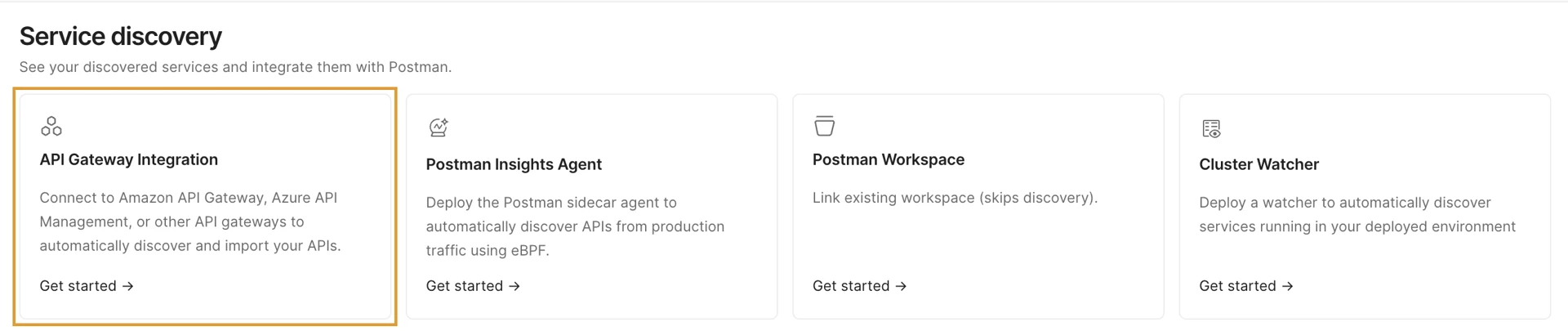
2. Using the Cluster Watcher for continuous service discovery
The Cluster Watcher continuously monitors your infrastructure for new or changed services and surfaces them in the API Catalog automatically, eliminating the need for you to manually find and add services. This is especially valuable in organizations where engineering teams regularly provision new services without a formal announcement process.
Tip: Kick off your onboarding flow when Cluster Watcher finds a new API. When Cluster Watcher surfaces a new API or service, use it as a trigger to reach out to the owning team and kick off the full onboarding workflow. This keeps your catalog accurate and creates a culture where every service is actively managed.
3. Using Postman Insights to find shadow endpoints
Connect Postman Insights to your catalog to analyze live traffic across your environments. Insights can surface shadow endpoints—API endpoints receiving real traffic that are not represented in any collection or specification in your catalog. Shadow endpoints are a governance risk: they are untested, undocumented, and not subject to your governance rules.
Tip: Review shadow endpoints on a regular cadence. Set a recurring review (e.g., weekly or bi-weekly) to triage new shadow endpoints surfaced by Insights. Assign ownership, initiate the onboarding PR, and close the governance gap before it compounds.
4. Connect Postman workspaces to keep the catalog up to date
The API Catalog automatically surfaces any git-connected Postman workspace in your organization. To ensure these entries remain accurate and current, every team should connect their workspace to their source code repository. This allows the catalog to reflect the actual state of each API as changes are merged—not just when a developer remembers to update documentation manually.
Using Agent Mode with the API Catalog
The API Catalog is built to be AI-native. Rather than manually navigating API views to investigate issues, assess coverage, or identify gaps, you can use Agent Mode to query, explore, and act on your catalog data using natural language.
Exploring the catalog using natural language
Agent Mode can search across your entire catalog to answer questions about your API landscape without requiring you to know exactly where to look:
| Context | Prompt |
|---|---|
| API Governance | "Which APIs in the catalog currently have failing governance rules?" |
| Coverage | "Are there any APIs in the catalog that don't have an associated OpenAPI specification?" |
| Maturity | "Which APIs are tagged as deprecated but still show active traffic in Insights?" |
| Ownership | "Which team owns the Identity service, and when was it last updated?" |
| Dependencies | "What services does the Payments API depend on?" |
Using Agent Mode to investigate failing or unhealthy services
When a service in your catalog shows degraded health—through a failing Monitor, an error spike in Insights, or a dropped governance score—Agent Mode can help you triage the issue without switching between tools.
Example: "The Checkout API is showing a high error rate in Insights. What are the most recent failures, and do they correlate with any recent changes to the specification or collections?"
Agent Mode queries the Insights data, reviews the recent change history for the associated workspace, identifies whether any specification changes coincide with the error spike, and surfaces a likely cause with next steps to remediate the issue.
Using Agent Mode to initiate repairs directly from the API Catalog
Agent Mode can move from diagnosis to action in the same conversation. Once it identifies an issue—such as a missing endpoint in a specification, a collection that doesn't match the spec, or a test coverage gap—it can draft the fix, create a pull request, or update the Postman artifacts on your behalf.
Example: "The Watcher service found a new endpoint, POST /api/v2/refunds, that isn't in the Refunds API specification. Add it to the spec with the correct request body and response schemas, and open a PR."
Tip: Use Agent Mode to act on shadow endpoints surfaced by Insights. When Insights surfaces shadow endpoints in your catalog view, use Agent Mode to immediately initiate the fix: "The catalog shows three shadow endpoints for the User service. Add them to the existing OpenAPI spec and generate a test collection for each one."
Key business outcomes
When you implement the best practices in this guide, you achieve three critical outcomes:
- Complete visibility through automation: By connecting your API Gateways, enabling the Cluster Watcher service, and linking workspaces to git, your catalog stays current without requiring manual updates from individual teams.
- Governance without bottlenecks: By setting up governance groups and tagging conventions before onboarding teams, you establish standards that run in the background and are enforced automatically in CI rather than as part of a manual review process.
- A catalog your AI agents can use: By centralizing specifications, metadata, and environment context in the catalog, you give Agent Mode the context needed to investigate, generate, and repair services—all without your developers having to explain your API ecosystem from scratch.